A published product is not always a product someone can buy. It also needs a price in the customer's market, stock, a delivery option that reaches the customer, a way to pay and tax settings. Poltura checks this whole path for every product and tells you in plain words what is missing.
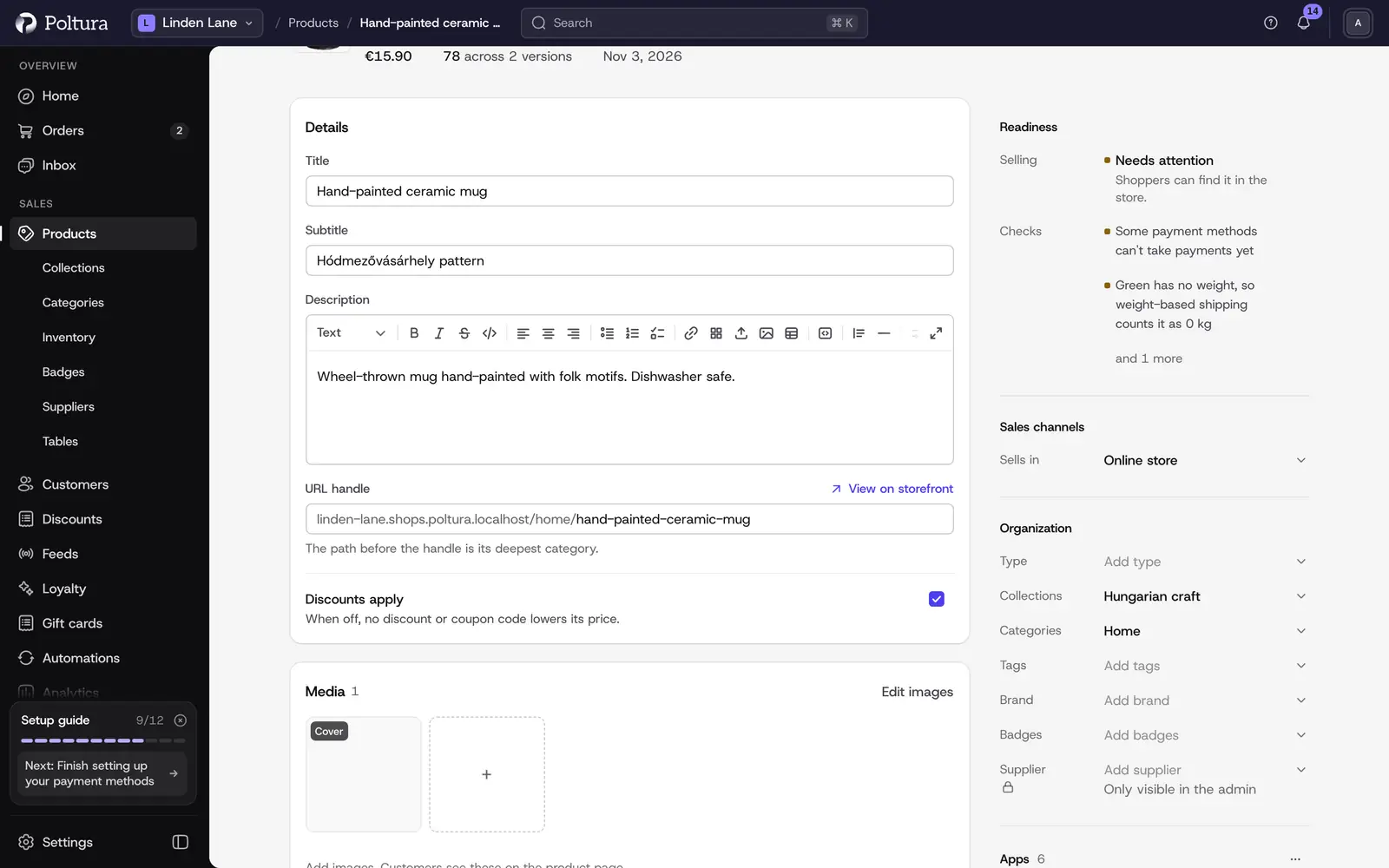
Where you see the checks
- On the product page. The Readiness panel shows a verdict and counts, such as the number of blockers and things to check, or Ready to publish and Everything checks out.
- On Selling setup. Findings about the whole store, such as a missing delivery option, are listed with their fixes. See Store settings and selling defaults.
- On Home. The setup tasks for a new store use the same checks. See Setup guide.
The verdicts
- Sellable: customers can buy the product.
- Not live: everything is in place, but the product is not published.
- Not sellable: at least one blocker stops every purchase.
- Needs attention: the product can be bought, but something should be looked at, for example a version that is out of stock.
- Couldn't check: one or more checks could not run. Editing still works. Reload the page in a moment.
What is checked
The checks cover three levels.
- The store: a storefront exists and is connected to your website, at least one market is ready with a currency and countries, a warehouse serves the storefront, a delivery group and a delivery option reach the countries of the market, a payment method is available and tax is set up.
- The product: it has something to buy, it is in your storefront, it is published and it is in a delivery group.
- Each version: it has a price in every market, it has stock in a warehouse that serves the storefront or may be sold without stock, and for digital products the delivery rule can be resolved.
Fix what blocks a product
Open the product and read the Readiness panel. It names the most serious findings first.
Fix what concerns the product itself on the product page: prices under Pricing or in the version table, stock under Inventory, the channel under Sales channels and the delivery group under Additional settings. See Prices and Edit a product.
To publish, choose Published in the status list next to the title.
Fix what concerns the whole store on Selling setup. There a finding with Fix this is repaired for you, and Open takes you to the page where you solve it yourself.
Reload the product page. The verdict updates once nothing stands in the way.
Good to know
- The checks never change anything by themselves. Only Fix this on Selling setup and your own edits do.
- Findings are counted per version where that matters. A finding can say that it affects several versions.
- A store that sells only digital products or services is not blocked by a missing delivery group in the same way a store with physical products is.
- The Readiness panel can be switched off under Store settings and selling defaults.
If something goes wrong
- "Couldn't check right now". The store did not answer the check. Reload the page in a moment.
- "This version has no price in this market". Enter the price for that market, see Prices.
- "This version tracks stock but has no stock item". Link or create a stock item for the version, see Inventory.
- "No delivery method reaches your customers". Add a delivery option for the countries of your market under Delivery, or use Set up standard delivery.
- "This market has no way to take payment". Switch on a payment method for the market under Payments.