The Discounts page is one list for every way you lower a price: discount codes shoppers type at checkout, automatic discounts, campaigns with a budget, sale prices and customer price lists.
The pages in this section:
- Create a discount: the seven kinds of discount and how to set each one up.
- Coupon restrictions: who can use a code, on what, when and how often.
- Promotions, Campaigns and Price lists: the detailed lists behind the discounts, shown in the sidebar in developer mode.
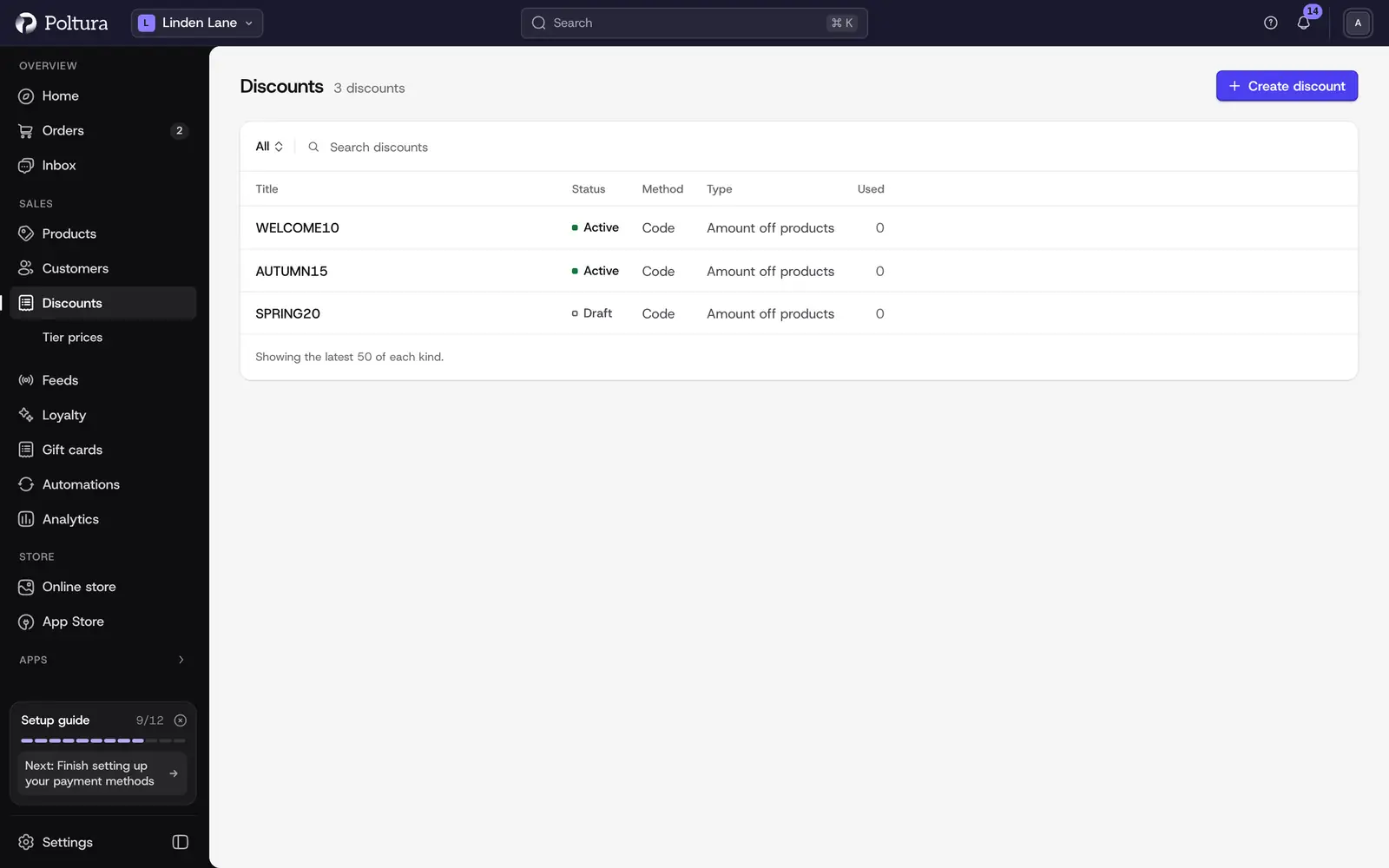
Read the list
Each row is one discount. The columns are:
- Title: the code or name, with a second line that shows when the discount is valid and how often it can be used, for example Always on or No limit.
- Status: where the discount stands right now.
- Method: Code when the shopper has to enter it, Automatic when it applies by itself.
- Type: Amount off products, Amount off order, Buy X get Y, Free shipping, Campaign, Sale pricing or Customer price list.
- Used: how many times the discount has been used.
The status menu next to the search narrows the list: All, Active, Draft, Scheduled and Expired. Use Search discounts to find a code or a name.
Open and change a discount
Open Discounts.
Choose a status, or search for the discount.
Select the row. A code or automatic discount opens its promotion page, a campaign opens the campaign page, and sale pricing or a customer price list opens the price list page.
Use Edit on that page to change it, or Delete to remove it.
On a promotion page you can also select Edit restrictions to decide who can use the code. See Coupon restrictions.
Pause a discount code
Open the discount from the list.
Select Edit.
Set Status to Inactive and save. Customers can no longer use the code. Set it back to Active to switch it on again.
Good to know
- A new code starts as Draft. Customers cannot use it until you set it to Active.
- The list shows the latest 50 discounts of each kind. Older ones are reachable through search in the developer mode lists.
- Codes that the store creates by itself stay out of the list: codes from loyalty rewards, product gift cards and return coupons.
- Gift cards are not discounts. They are a balance the customer pays with. See Gift cards.
- Shoppers enter discount codes and gift cards in the same field in the cart and at checkout.
- In developer mode the list gains the Combinations and Kind columns, and the sidebar shows the Campaigns and Price Lists pages.
If something goes wrong
- A shopper says a code does not work. Check that its status is Active, that its dates have started and not ended, and that its restrictions fit the cart. The storefront tells the shopper the reason, for example that the code has reached its usage limit.
- A discount is missing from the list. Choose All in the status menu and use the search. Only the latest 50 of each kind are listed.
- No discounts match that search. Clear the search field.