This page appears only when developer mode is switched on.
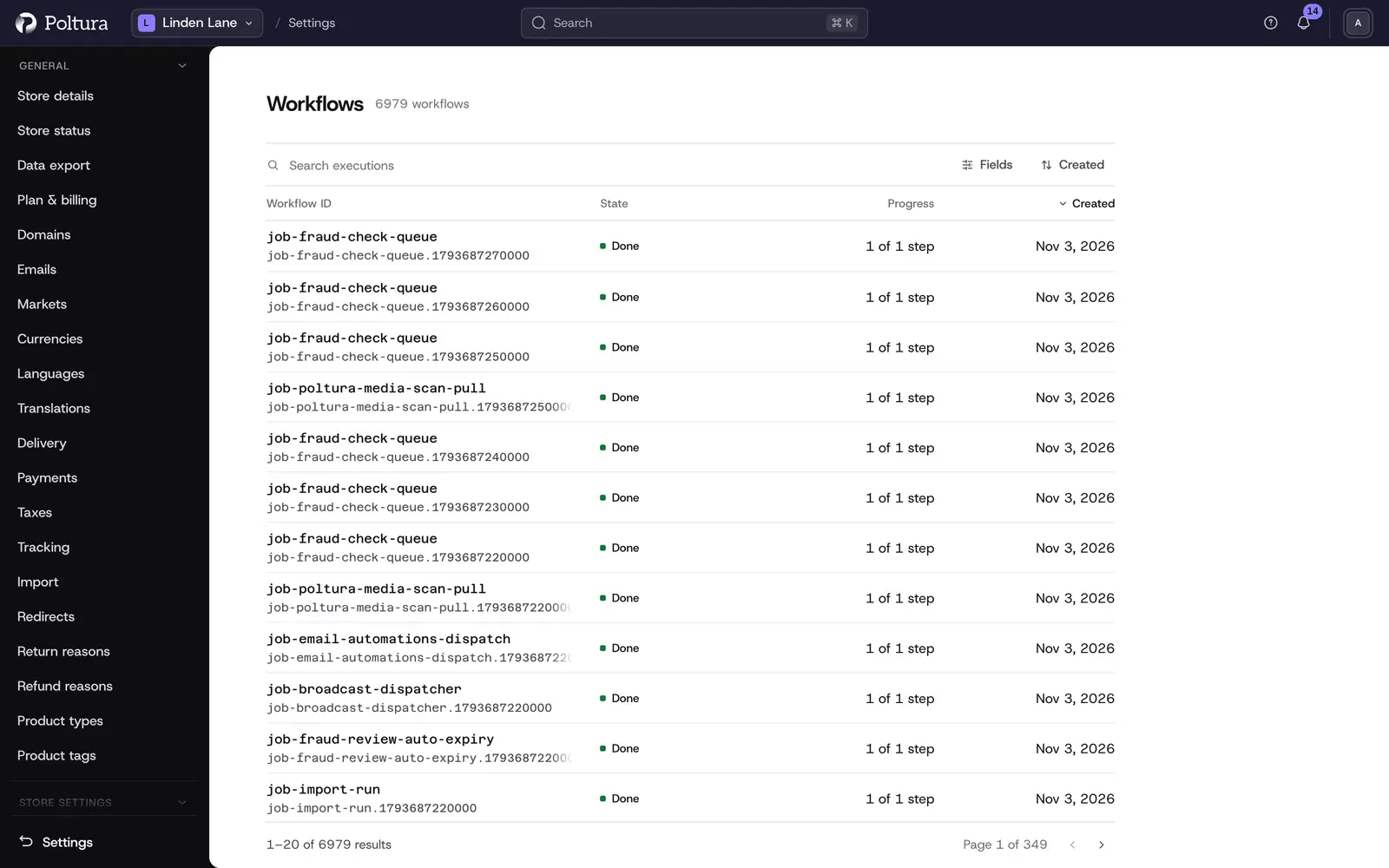
A workflow is a series of steps the store runs for one job, for example placing an order or creating a product. Workflows is the log of these runs. Use it when something did not happen as expected and you want to see whether a run finished, failed or is still going.
The pages are read-only. You cannot start, retry, cancel or delete a run here.
Before you start
You need a role that includes store settings, such as Owner, Administrator or Store manager.
Read the list
Open Settings and choose Workflows in the Developer group. Each row is one run:
- Workflow ID: which workflow ran.
- Transaction ID: the identifier of this run.
- State: where the run stands.
- Progress: how many steps are done, for example 3 of 5 steps.
- Created: when the run started.
The newest run is on top, 20 per page.
| State | Meaning |
|---|---|
| Done | Every step finished |
| Failed | A step failed |
| Reverted | The run failed and its finished steps were undone |
| Invoking | The run is in progress |
| Compensating | The run is undoing its finished steps |
Find a run
Open the Status filter and tick one or more states, for example Failed.
Use the Created filter to narrow the list to a day or a range. Days are counted in the time zone of your store.
Select a row to open the run.
The list also has a search box (Search executions). What a search term is matched against is not defined, so rely on the filters.
Read one run
The page of a run shows:
- Details: the Workflow ID and the Transaction ID, each with a copy button, the progress as one mark per step, and the created and updated dates.
- Timeline: every step with its name and its state. A step that has not run yet is shown as not started.
- Developer: shown in developer mode only. It holds the Payload, the data the run started with, and the run as raw JSON.
When you report a problem to support, copy the Transaction ID and include it.
Good to know
- Not every run is kept. Many workflows are removed from the log the moment they finish, so a run you expect may never appear. This is normal.
- Runs that are kept are removed automatically after a time that is set per workflow. There is no setting for it in the admin.
- A run that is still in progress is listed for as long as it runs.
- The page shows which step failed, but not why: the error and the output of a step are not shown. A failed run cannot be diagnosed from this page alone.
- The sort menu offers the created date only.
- A link to a run opens without developer mode too. The Developer section is then left out.
If something goes wrong
- A state reads like
workflowExecutions.state.not_started. This is a known display fault for two states.not_startedmeans the run has not begun,waiting_to_compensatemeans it is about to undo its steps. - "No workflows have been executed, yet." on a run you had open. The run was removed from the log. It also appears when the link is wrong.
- The list is empty. No run is kept at the moment, or your filters match nothing. Clear the filters.
- "You do not have access to this store". Your role does not include store settings. See People and roles.