Live View shows what is happening in your store right now: who is browsing, what sits in carts and which orders just came in. Use it during a campaign, a product launch or a newsletter send to see the effect at once.
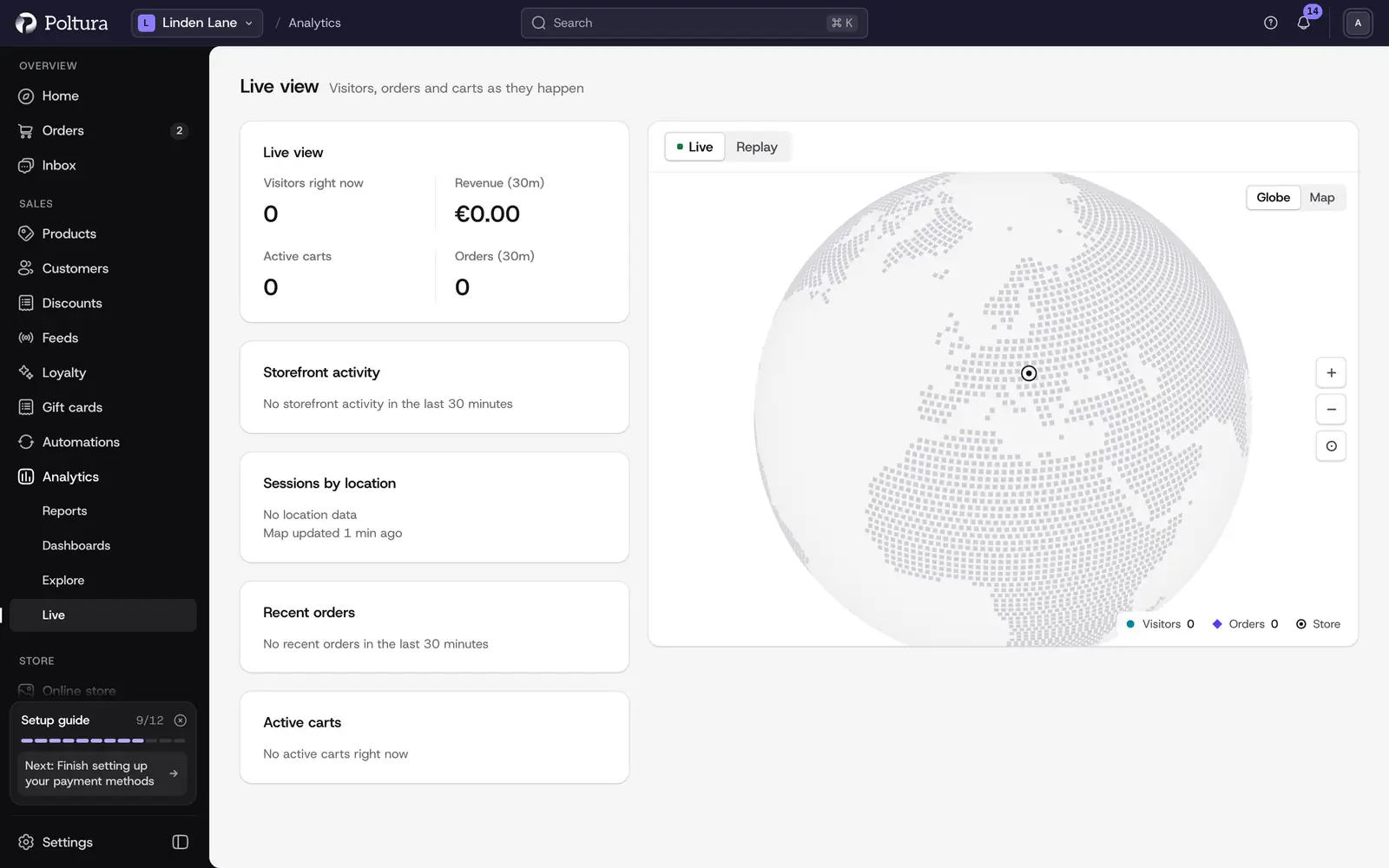
What the page shows
Four figures on top:
- Visitors right now: shoppers currently on your storefront.
- Revenue (30m): the value of orders placed in the last 30 minutes.
- Active Carts: carts shoppers are filling at the moment.
- Orders (30m): the number of orders in the last 30 minutes.
Below them:
- A globe with your Store, your Visitors and your Orders marked where they are. The legend under the globe says which mark is which.
- Sessions by location: the places your current visitors are in, with the number of visitors each.
- Recent Orders: the orders of the last 30 minutes with their number, the buyer's email address, region and value.
- Active Carts: each open cart with its owner (or Guest), the number of items and its value.
The page refreshes by itself every few seconds. You do not need to reload it.
Look around the globe
Under Analytics in the sidebar, choose Live.
Drag the globe to turn it.
Use Zoom in and Zoom out to get closer to a region.
Point at a mark to see how many visitors or orders it stands for.
Click Reset view to return to the starting position.
Replay what just happened
Replay plays the recent past back on the globe, so you can watch how a busy period unfolded.
Click Replay next to Live.
Choose how far back to go: 60s, 5 min, 15 min, 1 hour or 24 hours. The page shows Replaying while the replay runs.
Change the Speed to play faster, from 1× up to 60×, or drag the position slider to jump to a moment.
Click Pause to stop on a moment and Play to go on. When the replay reaches the present, it says Caught up.
Click Live to go back to the live picture.
Good to know
- Orders, revenue and carts come from your store itself and always show.
- Visitors and their locations come from the store's built-in visitor tracking. Until it is connected, the page says that live sessions and locations are not available, and the rest still works.
- A visitor whose place cannot be told is counted under Unknown, and an order without a region shows Unknown region.
- Locations are approximate. They show where a visit comes from, not an address.
- The Home page shows a smaller live map with Live visitors and new orders as they arrive.
If something goes wrong
- "Behavioural analytics isn't connected to this store yet". Visitor counts and locations are missing because visitor tracking is not connected. Orders and carts still show.
- "Session data is temporarily unavailable." The visitor data could not be read for the moment. It returns by itself.
- "No recent orders in the last 30 minutes". Nothing was ordered in that time. Older orders are in Orders.
- "No active carts right now". No shopper has an open cart at the moment.
- "No location data". There are no visitors with a known place right now.
- The replay shows "Loading replay…" for a while. A long window such as 24 hours takes longer to load. Wait, or pick a shorter window.