The Returns page, in the Store settings section of Settings, decides how customers can send things back and what they get for it. Start with a simple mode and move to the full workflow when you have more returns to handle.
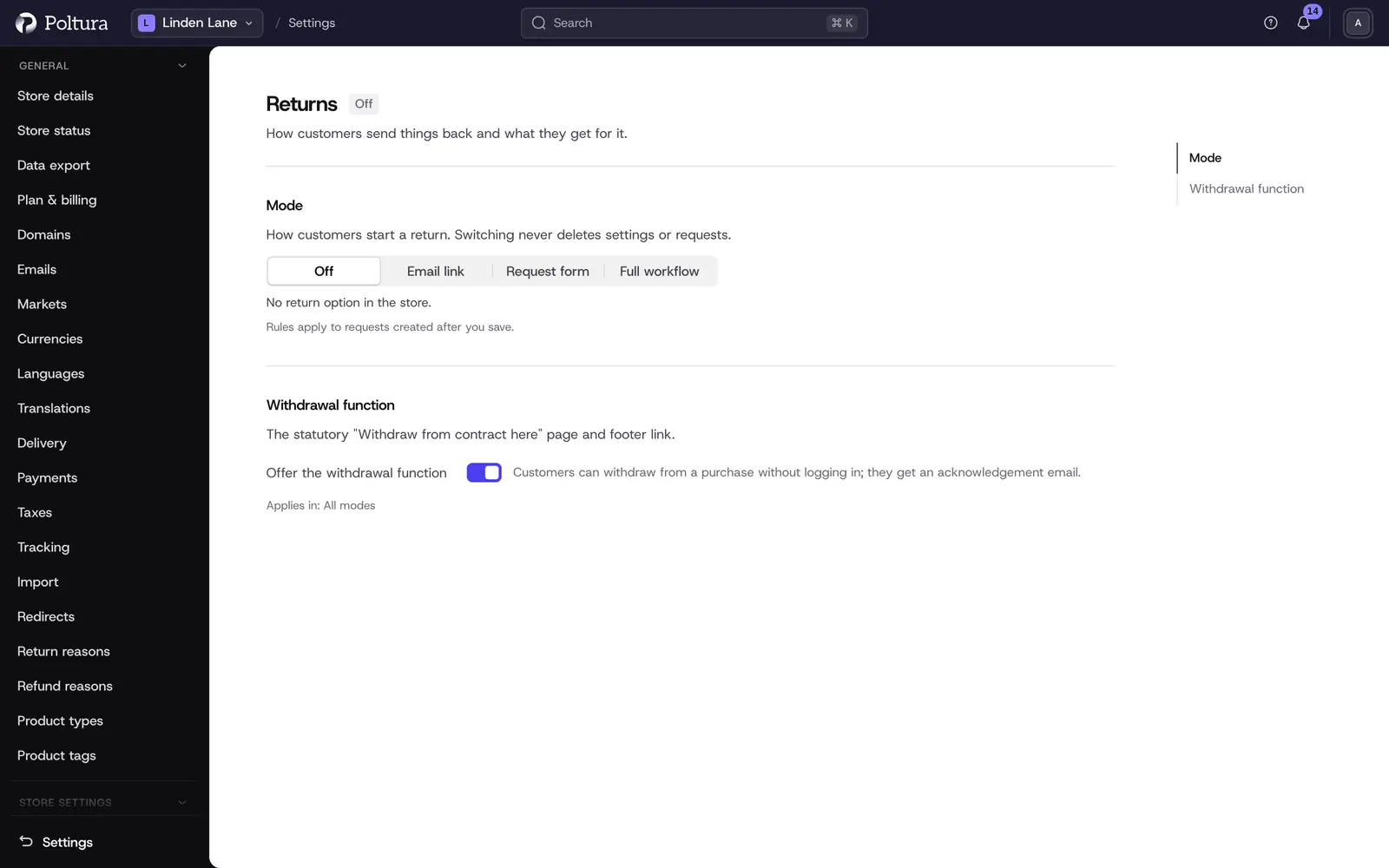
Choose the return mode
Open Settings and choose Returns under Store settings.
Under Mode, choose one:
- Off: no return option in the store.
- Email link: show your policy and a link that opens an email to you.
- Request form: customers fill in a short form and you get it by email.
- Full workflow: requests, approval, tracking, refunds and exchanges in one place.
Fill in the sections that appear for the mode. They are described below.
Select Save. The page confirms with Return settings saved.
The page only shows the sections the chosen mode uses. The values of the hidden sections are kept, so switching mode never loses settings or requests.
Sections in every mode
Withdrawal function has one switch, Offer the withdrawal function. It is on by default. See Withdrawals before you switch it off.
Sections from Email link upwards
- Contact: the Returns email address is used for the email link and as the reply address of return emails. Left empty, your store's reply-to address is used. Notify staff takes one address per line. Left empty, the store owners are notified.
- Instructions: your return instructions in English and Hungarian. They are shown in the store and in the approval email.
- Return window: Days is how long customers have to start a return, from 14 to 365. Starts from is Delivery or Order date.
- Return address: where customers send the parcel. They see it after approval.
Sections from Request form upwards
- Eligibility: the Products and Collections that cannot be returned, for example final sale items. Gift cards and digital products are never returnable.
- Reasons: your return reasons, each with two rules. Store's fault means no fees are charged for that reason. Photos is Not asked, Optional or Required. You can also Require a reason, Ask for the item's condition and set the Photos per item, up to 5. The list itself is edited under Manage return reasons. See return reasons.
- Resolutions: what customers can ask for. Refund, Store credit, Coupon code and Exchange, plus Custom resolutions you define, for example a repair. For coupons you can set Coupon valid for (days).
- Guest returns: Let guests return with order number and email. Guests get a secure link by email before they can continue.
Sections in the Full workflow
- Return methods: how customers get items back to you. Customer sends it, Drop-off point and In store, each with a note for customers. Receive at is the location the returned items go back into.
- Fees: the Return shipping fee is a flat amount deducted from the refund. The Restocking fee is a percentage of the item price, up to 50%. Refund original shipping gives the delivery fee back when a return covers every remaining item of the order.
- Approval: Approve requests automatically approves a request when every item is eligible and within the window.
Add a custom resolution
In Resolutions, select Add custom resolution.
Enter a Key of lowercase letters, numbers and dashes, for example
repair.Enter the Label and the Description in English and in Hungarian.
Tick Offer to customers if customers may choose it themselves.
Select Save.
You complete a custom resolution by hand on the return. See resolve and refund.
Good to know
- New rules apply to requests created after you save. Open returns keep the rules they were created under.
- The legal minimum for a consumer withdrawal is 14 days from delivery, so the window cannot be shorter.
- A return window that ends on a weekend runs until Monday.
- Fees are never charged on withdrawals or when the reason is the store's fault.
- Store credit is issued as a gift card balance. It can only be offered when gift cards are switched on.
- A coupon with no validity set never expires.
- You have to offer at least one return method and at least one resolution.
- When you first choose Request form or Full workflow and the store has no return reasons, eight default reasons are added for you.
- Staff can create a return outside the window from the order page. See create a return.
If something goes wrong
- "Some settings are not valid. Check the highlighted fields." Scroll to the marked field. Common causes are a window outside 14 to 365 days or a restocking fee above 50%.
- "Offer at least one return method." or "Offer at least one resolution." Tick at least one in that section.
- Store credit is grayed out. Switch on gift cards first.
- Customers do not see a return option. Check that the mode is not Off and that the order is delivered and still within the window.